

Analytics view provides at-a-glance insights into your data (images, videos, and video frames), your labels, and your model predictions. Filtering data, labels, and predictions affects the metrics that appear in the Analytics view. Data and label analytics display Metric Correlation and class distribution across your data and labels. You can adjust the X and Y values on the Metric Correlation across a number of data and label metrics. If the Project has no labels, the class distribution graph is empty.Documentation Index
Fetch the complete documentation index at: https://docs.encord.com/llms.txt
Use this file to discover all available pages before exploring further.
Active
Prediction analytics in Active display Metric Correlation and prediction distribution for your ML model. Prediction distribution provides class and underrepresented class data. You can adjust the X and Y values on the Metric Correlation across a number of data and label metrics. To access the Analytics view in Active:- Log in to the Encord platform. The Encord home page appears.
- Click Active. The Active page appears displaying all Active Projects you have access to.
-
Click an Active Project.
The Explorer page for the Project appears.
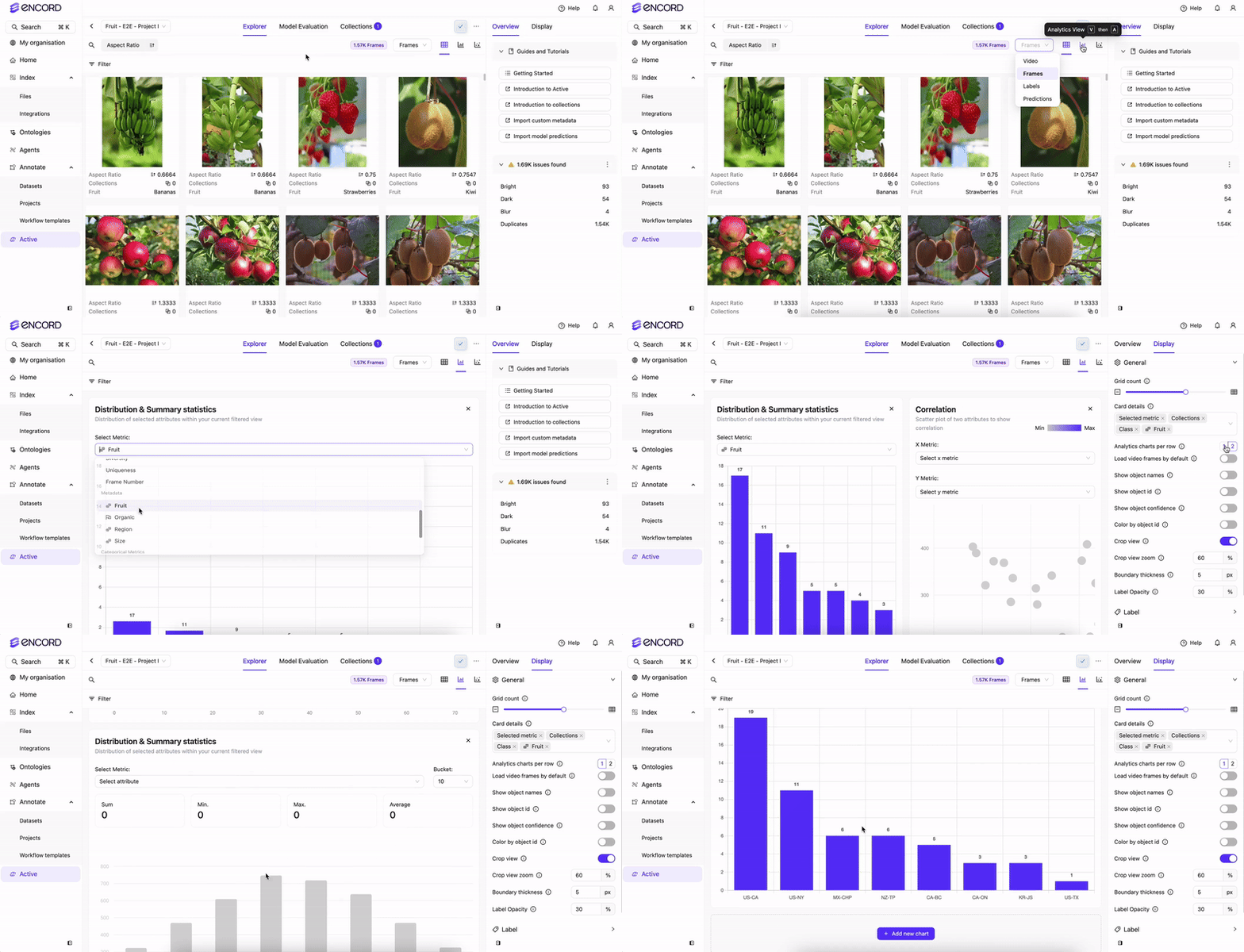
-
Click any of the following:
- Data
- Labels
- Predictions
- Click the Analytics view icon. The Analytics view appears.
- Select the data you want to display for the distribution or correlation graphs.
- Filter, sort, and search on your data, labels, and predictions.
- Click the Analytics view icon for an updated view.
Annotate
To access the Analytics view in Annotate:- Log in to the Encord platform. The Encord home page appears.
- Click Projects. The Projects page appears displaying all Projects you have access to.
- Click a Project.
- Click Explore.
-
Click any of the following:
- Video
- Frames
- Labels
- Click the Analytics view icon. The Analytics view appears.
- Select the data you want to display for the distribution or correlation graphs.
- Filter, sort, and search on your data and labels.
- Click the Analytics view icon for an updated view.