

The Explorer view in Index lets you view and filter data units by labels across all your Encord projects, and add matching data units to Collections for further curation.Documentation Index
Fetch the complete documentation index at: https://docs.encord.com/llms.txt
Use this file to discover all available pages before exploring further.
Filter
You can filter data units in Index based on the presence of labels, and the source of those labels (Projects and branches).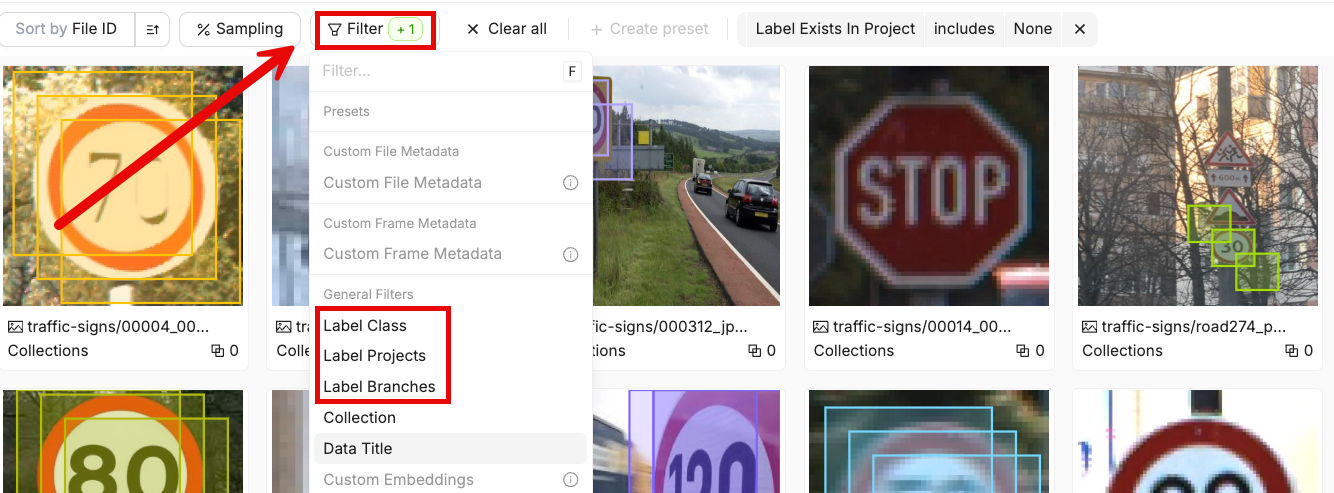
| Filter | Description |
|---|---|
| Label Class | Filter data units that contain labels from a specific ontology class. |
| Label Projects | Filter data units that contain labels from specific Projects. |
| Label Branches | Filter data units that contain labels from specific label branches. |
Select Labels to Display
You can display labels directly on data units in the Data, Frames, and Video views. These settings control which labels are shown, but do not affect which data units are included in your filtered results. The sidebar allows you to control which labels are displayed on each data unit.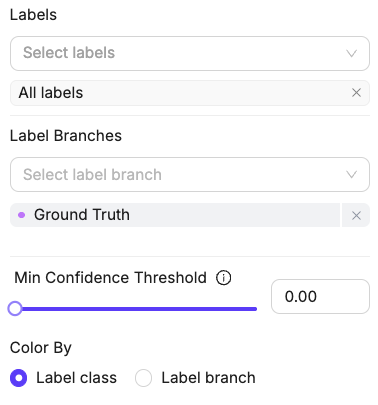
| Setting | Description |
|---|---|
| Labels | Choose the ontology classes to display labels from. |
| Label Branches | Choose the label branches to display labels from. |
| Min Confidence Threshold | Only display labels with a confidence score above the selected threshold. |
| Color By | Control whether labels share the same color based on their class or label branch. |