

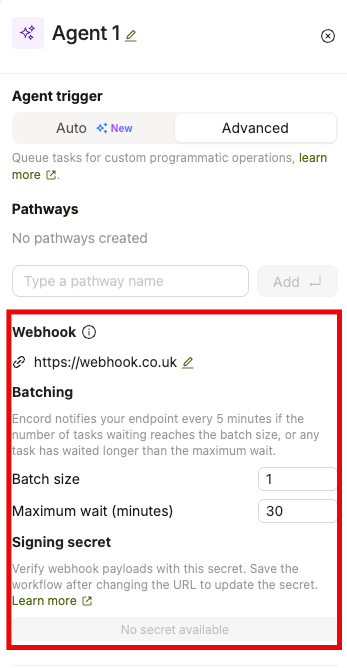
- In the Workflow, select the Agent stage and choose Advanced.
- Under Webhook, click the edit icon, enter your endpoint URL, and press Enter.
- Under Batching, set the Batch size and Maximum wait (minutes).
- Save the Workflow. You can use the generated Signing secret to verify webhook signatures.
Removing the webhook URL also removes its batching settings. Switching the Agent stage to Auto removes the webhook configuration.
- The batch size is met when the number of queued tasks reaches the set size.
- The maximum wait is met when the oldest queued task has been waiting longer than the set limit.
Webhook SDK support for Agents documentation is available here.
Prerequisites
- The package:
encord-agentsv0.2.10 or later, plus FastAPI if you use the FastAPI receiver:python -m pip install "encord-agents>=0.2.10" "fastapi[standard]". - An Agent stage: a Workflow with an Agent stage whose Custom Agent runs in Advanced mode, so you can register a webhook URL on it.
- Encord credentials for the runner: the SSH key your Task Agent already uses to fetch and update tasks, set as
ENCORD_SSH_KEY_FILEorENCORD_SSH_KEY. - A publicly reachable HTTPS endpoint: Encord must be able to POST to it. Because anyone who finds the URL can call it, every request is signed and your receiver must verify the signature.
ENCORD_WEBHOOK_SECRET, or pass it explicitly. Check it again whenever you change that configuration. Verification never needs your Encord credentials, so a receiver can check signatures before it holds any.
Build a FastAPI Receiver
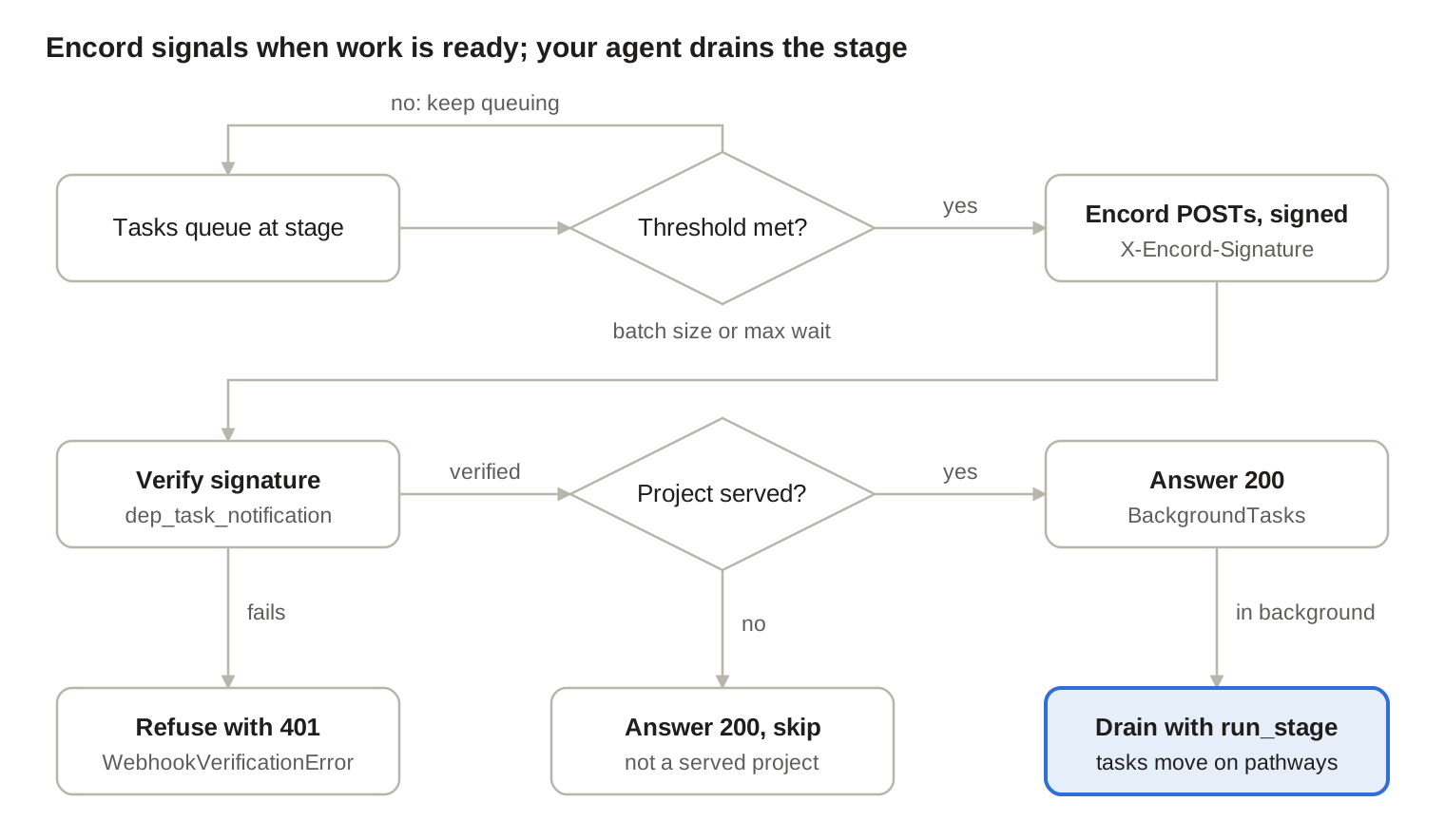
The receiver verifies each notification, checks it concerns a project this deployment serves, answers 200 straight away, then drains the stage in the background. It is the runnable example fromexamples/task_agents/fastapi_task_notifications.py.
- Create the app with
get_encord_app. It installs the exception handlers that turn failed verification into responses, so unverified requests never reach your route. - Define the stage logic on a
Runner. This is the same@runner.stagefunction you would write for a polling Task Agent. It returns the pathway to move each task along. - Inject the notification with
dep_task_notification. The dependency reads the raw request body, verifies the signature againstENCORD_WEBHOOK_SECRETand returns aTaskNotification. - Check the Project, then hand off. Verification proves the request came from Encord, not that it concerns a Project this deployment should act on. Return early for any other Project, then queue
run_stageas a background task.
None answers 200, which is what Encord expects. Any other status is recorded as a failed delivery.
Serving several Projects: run_stage accepts a project_hash, so one deployment can drain stages across Projects.
As an additional enforcement step you may keep an explicit allow-list and pass the Project through only after checking it:
FastAPI() directly instead of using get_encord_app, call add_notification_handlers(app). Without it, a request that fails verification surfaces as an unhandled 500 instead of a 401.
Route Specific Secrets & Notifications
Usedep_task_notification_with_args when ENCORD_WEBHOOK_SECRET cannot cover every route, for example when one service receives notifications for two stages with different secrets. It returns a dependency that verifies against the secret you pass. You can also widen the timestamp tolerance, but only for a host whose clock cannot be kept closer than the default 300 seconds.
TaskNotification your route receives exposes these fields:
To branch on the reason, compare against the enum and treat anything else as unknown. Use
isinstance, because the enum subclasses str:
run_stage works from the stage’s queue as it stands, so an extra notification only triggers another look.
Notifications On Any Runtime
encord_agents.core.webhooks works with any framework or serverless platform.
verify_and_parse_notification(body, headers, *, secret=None, tolerance_seconds=300)verifies the request and returns aTaskNotification. Header lookup is case-insensitive, so a lowercased AWS Lambda headers dict works as-is.verify_signature(body, *, signature, timestamp, secret=None, tolerance_seconds=300)only checks the signature, if you extract the headers yourself.parse_notification(body)only reads the body. It trusts its input, so call it after verification.
<timestamp>.<body> using the signing secret. It arrives in X-Encord-Signature, with the Unix timestamp in X-Encord-Timestamp.
Configure, Deploy and Test
- Deploy the receiver to a publicly reachable HTTPS URL, for example
https://agents.example.com/encord/task-ready. SetENCORD_WEBHOOK_SECRETand your SSH key in the deployment’s environment. - Register the URL on the agent stage. In the workflow, open the agent stage’s Custom Agent in Advanced mode, add the webhook URL, and set the minimum batch size and maximum wait. See Configure batched webhook notifications.
- Copy the signing secret shown with that configuration into
ENCORD_WEBHOOK_SECRET. If you change the configuration later, check the secret again. - Send tasks to the stage and watch the receiver’s logs. You should see a 200 for each notification and the stage’s tasks moving along their pathways.
body after signing, or sign with another secret, and the same request returns 401.
Responses & Errors
Encord reads only the status code, and records anything other than 200 as a failed delivery. Withget_encord_app or add_notification_handlers, each outcome maps to a status automatically:
A single URL can be registered on more than one workflow stage, which is why other event types are acknowledged rather than refused. Encord adds fields and reason values without changing the envelope version, so the parser tolerates them. It refuses only a new version, which Encord reserves for breaking changes.