> ## Documentation Index
> Fetch the complete documentation index at: https://docs.encord.com/llms.txt
> Use this file to discover all available pages before exploring further.
# PDF
PDFs support annotation using bounding box, polygon, and bitmask object labels and classifications. Using the Encord SDK you can import labels and classifications directly to PDFs that already exist in an Annotate Project. You can also use the SDK to view labels and classifications that exist on a PDF.
## Bounding Boxes and PDFs
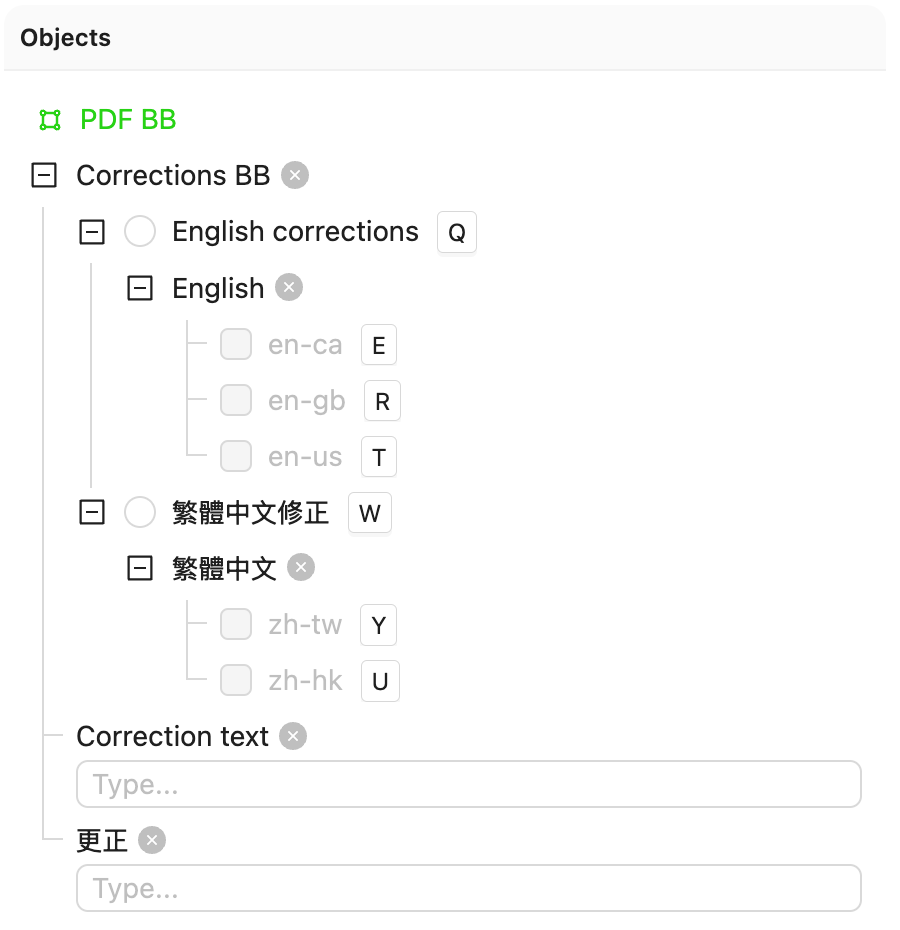
The following screenshot provides the Ontology used with the code example.
```python Bounding Boxes and PDFs theme={"dark"}
# Import dependencies
from encord import EncordUserClient, Project
from encord.objects import ChecklistAttribute, Object, ObjectInstance, Option, RadioAttribute, TextAttribute
from encord.objects.coordinates import BoundingBoxCoordinates
# SSH and Project details
SSH_PATH = "/Users/chris-encord/ssh-private-key.txt"
PROJECT_ID = "12f1ebfb-bfdc-4682-a82b-bc20e5e01416"
# Create user client
user_client: EncordUserClient = EncordUserClient.create_with_ssh_private_key(
ssh_private_key_path=SSH_PATH,
# For US platform users use "https://api.us.encord.com"
domain="https://api.encord.com",
)
# Get project
project: Project = user_client.get_project(PROJECT_ID)
ontology_structure = project.ontology_structure
# Get ontology object
box_ontology_object: Object = ontology_structure.get_child_by_title(title="PDF BB", type_=Object)
# Define radio attribute for correction types
correction_radio_attribute = ontology_structure.get_child_by_title(type_=RadioAttribute, title="Corrections BB")
english_correction_option = correction_radio_attribute.get_child_by_title(type_=Option, title="English corrections")
chinese_correction_option = correction_radio_attribute.get_child_by_title(type_=Option, title="繁體中文修正")
# Define checklist attributes
english_checklist_attribute = ontology_structure.get_child_by_title(type_=ChecklistAttribute, title="English")
en_ca_option = english_checklist_attribute.get_child_by_title(type_=Option, title="en-ca")
en_gb_option = english_checklist_attribute.get_child_by_title(type_=Option, title="en-gb")
en_us_option = english_checklist_attribute.get_child_by_title(type_=Option, title="en-us")
chinese_checklist_attribute = ontology_structure.get_child_by_title(type_=ChecklistAttribute, title="繁體中文")
zh_tw_option = chinese_checklist_attribute.get_child_by_title(type_=Option, title="zh-tw")
zh_hk_option = chinese_checklist_attribute.get_child_by_title(type_=Option, title="zh-hk")
# Define text attributes
english_correction_text_attribute = ontology_structure.get_child_by_title(type_=TextAttribute, title="Correction text")
chinese_correction_text_attribute = ontology_structure.get_child_by_title(type_=TextAttribute, title="更正")
# Example label data (you can adjust this)
pdf_labels = {
"the-iliad.pdf": {
# Specify the page number in the PDF. In the example below, page number 103 is labeled
103: {
"label_ref": "pdf_label_001",
"coordinates": BoundingBoxCoordinates(height=0.4, width=0.4, top_left_x=0.1, top_left_y=0.1),
"correction_type": "English corrections",
"checklist_options": "en-ca, en-gb",
"text_correction": "Fixed typo in English text.",
}
},
"dracula.pdf": {
# Specify the page number in the PDF. In the example below, page number 17 is labeled
17: {
"label_ref": "pdf_label_002",
"coordinates": BoundingBoxCoordinates(height=0.3, width=0.5, top_left_x=0.2, top_left_y=0.2),
"correction_type": "繁體中文修正",
"checklist_options": "zh-tw",
"text_correction": "修正了中文繁體的標點符號。",
}
}
}
# Loop through each data unit (image, video, etc.)
for data_unit, frame_coordinates in pdf_labels.items():
object_instances_by_label_ref = {}
# Get the label row for the current data unit
label_row = project.list_label_rows_v2(data_title_eq=data_unit)[0]
label_row.initialise_labels()
# Loop through the frames for the current data unit
for frame_number, items in frame_coordinates.items():
if not isinstance(items, list): # Single or multiple objects in the frame
items = [items]
for item in items:
label_ref = item["label_ref"]
coord = item["coordinates"]
correction_type = item["correction_type"]
checklist_options_str = item.get("checklist_options", "")
text_correction = item.get("text_correction", "")
# Check if label_ref already exists for reusability
if label_ref not in object_instances_by_label_ref:
box_object_instance: ObjectInstance = box_ontology_object.create_instance()
object_instances_by_label_ref[label_ref] = box_object_instance # Store for reuse
# Set correction type (radio attribute)
if correction_type == "English corrections":
box_object_instance.set_answer(attribute=correction_radio_attribute, answer=english_correction_option)
# Set checklist options for English
checklist_answers = []
for option in [opt.strip() for opt in checklist_options_str.split(",")]:
if option == "en-ca":
checklist_answers.append(en_ca_option)
elif option == "en-gb":
checklist_answers.append(en_gb_option)
elif option == "en-us":
checklist_answers.append(en_us_option)
if checklist_answers:
box_object_instance.set_answer(
attribute=english_checklist_attribute,
answer=checklist_answers,
overwrite=True,
)
# Set text correction
if text_correction:
box_object_instance.set_answer(attribute=english_correction_text_attribute, answer=text_correction)
elif correction_type == "繁體中文修正":
box_object_instance.set_answer(attribute=correction_radio_attribute, answer=chinese_correction_option)
# Set checklist options for Chinese
checklist_answers = []
for option in [opt.strip() for opt in checklist_options_str.split(",")]:
if option == "zh-tw":
checklist_answers.append(zh_tw_option)
elif option == "zh-hk":
checklist_answers.append(zh_hk_option)
if checklist_answers:
box_object_instance.set_answer(
attribute=chinese_checklist_attribute,
answer=checklist_answers,
overwrite=True,
)
# Set text correction
if text_correction:
box_object_instance.set_answer(attribute=chinese_correction_text_attribute, answer=text_correction)
else:
# Reuse existing instance across frames
box_object_instance = object_instances_by_label_ref[label_ref]
# Assign the object to the frame and track it
box_object_instance.set_for_frames(coordinates=coord, frames=frame_number)
# Add object instances to label_row **only if they have frames assigned**
for box_object_instance in object_instances_by_label_ref.values():
if box_object_instance.get_annotation_frames(): # Ensures it has at least one frame
label_row.add_object_instance(box_object_instance)
# Upload all labels for this data unit (video/image) to the server
label_row.save()
print("Labels with English and Mandarin corrections have been added for all data units.")
```
## Polygons and PDFs
Polygons offer a number of options when labeling PDFs.
Polygons can have simple and complex shapes, including being enclosed in one another, and encompassing separate regions. In each case the polygon's coordinates are arranged in a different way.
To specify coordinates for polygons use the following format:
```python Simple theme={"dark"}
PolygonCoordinates(polygons=[[[PointCoordinate(x1, y1), PointCoordinate(x2, y2),...]]]
```
```python Donut theme={"dark"}
PolygonCoordinates(polygons=
[
[
[PointCoordinate(x1, y1), PointCoordinate(x2, y2),...], # Outer ring
[PointCoordinate(x1, y1), PointCoordinate(x2, y2),...], # Inner ring
]
]
```
```python Multiple Polygons theme={"dark"}
PolygonCoordinates(polygons=
[
[
[PointCoordinate(x1, y1), PointCoordinate(x2, y2),...], # Polygon 1
],
[
[PointCoordinate(x1, y1), PointCoordinate(x2, y2),...], # Polygon 2
],
[
[PointCoordinate(x1, y1), PointCoordinate(x2, y2),...], # Polygon 3
],
]
```
```python Donut with Object Inside theme={"dark"}
PolygonCoordinates(polygons=
[
[
[PointCoordinate(x1, y1), PointCoordinate(x2, y2),...], # Outer ring
[PointCoordinate(x1, y1), PointCoordinate(x2, y2),...], # Inner ring
],
[
[PointCoordinate(x1, y1), PointCoordinate(x2, y2),...], # Polygon inside
],
]
```
For more information on polygon labels [go here](/sdk-documentation/sdk-labels/sdk-import-labels-annotations-visual#polygons-advanced)
This example uses multiple polygons to label the PDF.
The following screenshot provides the Ontology used with the code example.

```python Polygons and PDFs theme={"dark"}
# Import dependencies
from encord import EncordUserClient, Project
from encord.objects import ChecklistAttribute, Object, ObjectInstance, Option, RadioAttribute, TextAttribute
from encord.objects.coordinates import PolygonCoordinates, PointCoordinate
# SSH and Project details
SSH_PATH = "/Users/chris-encord/ssh-private-key.txt"
PROJECT_ID = "12f1ebfb-bfdc-4682-a82b-bc20e5e01416"
# Create user client
user_client: EncordUserClient = EncordUserClient.create_with_ssh_private_key(
ssh_private_key_path=SSH_PATH,
# For US platform users use "https://api.us.encord.com"
domain="https://api.encord.com",
)
# Get Project
project: Project = user_client.get_project(PROJECT_ID)
ontology_structure = project.ontology_structure
# Get ontology object
polygon_ontology_object: Object = ontology_structure.get_child_by_title(title="PDF PG", type_=Object)
# Define radio attribute for correction types
correction_radio_attribute = ontology_structure.get_child_by_title(type_=RadioAttribute, title="Corrections PG")
english_correction_option = correction_radio_attribute.get_child_by_title(type_=Option, title="English corrections")
chinese_correction_option = correction_radio_attribute.get_child_by_title(type_=Option, title="繁體中文修正")
# Define checklist attributes
english_checklist_attribute = ontology_structure.get_child_by_title(type_=ChecklistAttribute, title="English")
en_ca_option = english_checklist_attribute.get_child_by_title(type_=Option, title="en-ca")
en_gb_option = english_checklist_attribute.get_child_by_title(type_=Option, title="en-gb")
en_us_option = english_checklist_attribute.get_child_by_title(type_=Option, title="en-us")
chinese_checklist_attribute = ontology_structure.get_child_by_title(type_=ChecklistAttribute, title="繁體中文")
zh_tw_option = chinese_checklist_attribute.get_child_by_title(type_=Option, title="zh-tw")
zh_hk_option = chinese_checklist_attribute.get_child_by_title(type_=Option, title="zh-hk")
# Define text attributes
english_correction_text_attribute = ontology_structure.get_child_by_title(type_=TextAttribute, title="Correction text")
chinese_correction_text_attribute = ontology_structure.get_child_by_title(type_=TextAttribute, title="更正")
# Example label data (you can adjust this)
pdf_labels = {
"the-iliad.pdf": {
# Specify the page number in the PDF. In the example below, page number 103 is labeled
103: {
"label_ref": "pdf_label_001",
"coordinates": PolygonCoordinates(polygons=[
[
# First rectangle
[
PointCoordinate(0.1, 0.1),
PointCoordinate(0.4, 0.1),
PointCoordinate(0.4, 0.3),
PointCoordinate(0.1, 0.3),
PointCoordinate(0.1, 0.1) # Close the polygon
]
],
[
# Second rectangle
[
PointCoordinate(0.5, 0.5),
PointCoordinate(0.7, 0.5),
PointCoordinate(0.7, 0.7),
PointCoordinate(0.5, 0.7),
PointCoordinate(0.5, 0.5) # Close the polygon
]
],
]),
"correction_type": "English corrections",
"checklist_options": "en-ca, en-gb",
"text_correction": "Fixed typo in English text.",
}
},
"dracula.pdf": {
# Specify the page number in the PDF. In the example below, page number 17 is labeled
17: {
"label_ref": "pdf_label_002",
"coordinates": PolygonCoordinates(polygons=[
[
# First rectangle
[
PointCoordinate(0.2, 0.2),
PointCoordinate(0.5, 0.2),
PointCoordinate(0.5, 0.4),
PointCoordinate(0.2, 0.4),
PointCoordinate(0.2, 0.2) # Close the polygon
]
],
[
# Second rectangle
[
PointCoordinate(0.6, 0.6),
PointCoordinate(0.8, 0.6),
PointCoordinate(0.8, 0.8),
PointCoordinate(0.6, 0.8),
PointCoordinate(0.6, 0.6) # Close the polygon
]
],
]),
"correction_type": "繁體中文修正",
"checklist_options": "zh-tw",
"text_correction": "修正了中文繁體的標點符號。",
}
}
}
# Loop through each data unit (image, video, etc.)
for data_unit, frame_coordinates in pdf_labels.items():
object_instances_by_label_ref = {}
# Get the label row for the current data unit
label_row = project.list_label_rows_v2(data_title_eq=data_unit)[0]
label_row.initialise_labels()
# Loop through the frames for the current data unit
for frame_number, items in frame_coordinates.items():
if not isinstance(items, list): # Single or multiple objects
items = [items]
for item in items:
label_ref = item["label_ref"]
coord = item["coordinates"]
correction_type = item["correction_type"]
checklist_options_str = item.get("checklist_options", "")
text_correction = item.get("text_correction", "")
# Check if label_ref already exists for reusability
if label_ref not in object_instances_by_label_ref:
polygon_object_instance: ObjectInstance = polygon_ontology_object.create_instance()
object_instances_by_label_ref[label_ref] = polygon_object_instance # Store for reuse
# Set correction type (radio attribute)
if correction_type == "English corrections":
polygon_object_instance.set_answer(attribute=correction_radio_attribute, answer=english_correction_option)
# Set checklist options for English
checklist_answers = []
for option in [opt.strip() for opt in checklist_options_str.split(",")]:
if option == "en-ca":
checklist_answers.append(en_ca_option)
elif option == "en-gb":
checklist_answers.append(en_gb_option)
elif option == "en-us":
checklist_answers.append(en_us_option)
if checklist_answers:
polygon_object_instance.set_answer(
attribute=english_checklist_attribute,
answer=checklist_answers,
overwrite=True,
)
# Set text correction
if text_correction:
polygon_object_instance.set_answer(attribute=english_correction_text_attribute, answer=text_correction)
elif correction_type == "繁體中文修正":
polygon_object_instance.set_answer(attribute=correction_radio_attribute, answer=chinese_correction_option)
# Set checklist options for Chinese
checklist_answers = []
for option in [opt.strip() for opt in checklist_options_str.split(",")]:
if option == "zh-tw":
checklist_answers.append(zh_tw_option)
elif option == "zh-hk":
checklist_answers.append(zh_hk_option)
if checklist_answers:
polygon_object_instance.set_answer(
attribute=chinese_checklist_attribute,
answer=checklist_answers,
overwrite=True,
)
# Set text correction
if text_correction:
polygon_object_instance.set_answer(attribute=chinese_correction_text_attribute, answer=text_correction)
else:
# Reuse existing instance across frames
polygon_object_instance = object_instances_by_label_ref[label_ref]
# Assign the object to the frame and track it
polygon_object_instance.set_for_frames(coordinates=coord, frames=frame_number)
# Add object instances to label_row **only if they have frames assigned**
for polygon_object_instance in object_instances_by_label_ref.values():
if polygon_object_instance.get_annotation_frames(): # Ensures it has at least one frame
label_row.add_object_instance(polygon_object_instance)
# Upload all labels for this data unit (video/image) to the server
label_row.save()
print("Labels with English and Mandarin corrections have been added for all data units.")
```
## Classifications with PDFs
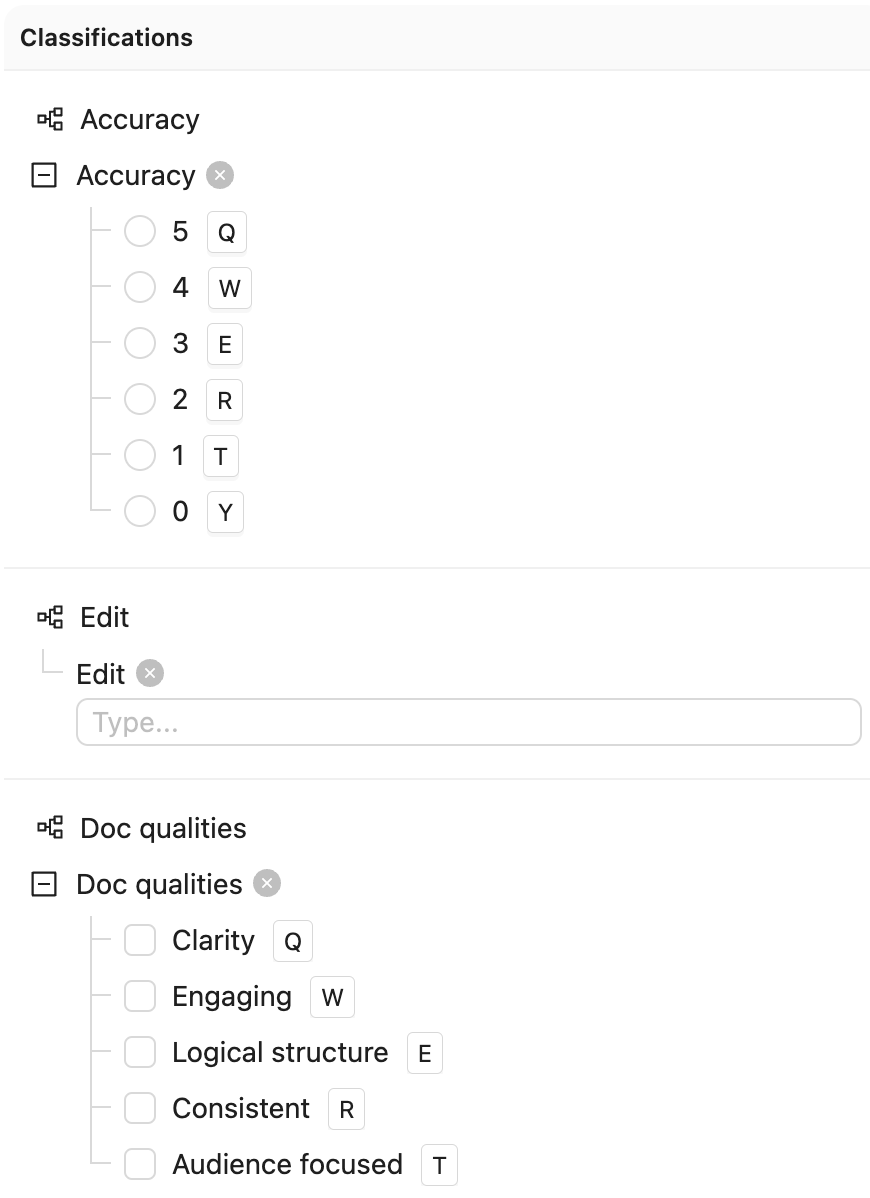
The following screenshot provides the Ontology used with the code example.
```python Classifications and PDFs theme={"dark"}
# Import dependencies
from pathlib import Path
from encord import EncordUserClient
from encord.objects import Classification, Option
# Configuration
SSH_PATH = "/Users/chris-encord/ssh-private-key.txt"
PROJECT_ID = "9ae72230-c686-484b-a6b9-9ed631c6dce8"
# Create user client using access key
user_client = EncordUserClient.create_with_ssh_private_key(
ssh_private_key_path=SSH_PATH,
# For US platform users use "https://api.us.encord.com"
domain="https://api.encord.com",
)
# Get Project
project = user_client.get_project(PROJECT_ID)
# Define specific configurations for each data unit
data_unit_configs = [
{
"title": "anne-of-green-gables.pdf",
"classifications": [
{
"name": "Accuracy",
"type": "radio",
"option": "5",
"frame_range": (10, 20)
},
{
"name": "Doc qualities",
"type": "checklist",
"options": ["Clarity", "Engaging"],
"frame_range": (15, 25)
}
]
},
{
"title": "the-legend-of-sleepy-hollow.pdf",
"classifications": [
{
"name": "Accuracy",
"type": "radio",
"option": "3",
"frame_range": (5, 15)
},
{
"name": "Edit",
"type": "text",
"text": "Needs more context",
"frame_range": (3, 10)
}
]
},
{
"title": "the-iliad.pdf",
"classifications": [
{
"name": "Doc qualities",
"type": "checklist",
"options": ["Logical structure", "Audience focused"],
"frame_range": (30, 40)
}
]
}
]
# Process each data unit with its specific configurations
for config in data_unit_configs:
try:
# Get the label row for the specific data unit
label_rows = project.list_label_rows_v2(
data_title_eq=config["title"]
)
if not label_rows:
print(f"No label row found for {config['title']}, skipping...")
continue
label_row = label_rows[0]
# Download the existing labels
label_row.initialise_labels()
# Get the ontology structure
ontology_structure = label_row.ontology_structure
# Process each classification for this data unit
for classification_config in config["classifications"]:
# Find the classification in the ontology
classification = ontology_structure.get_child_by_title(
title=classification_config["name"],
type_=Classification
)
# Create classification instance
classification_instance = classification.create_instance()
# Set the answer based on classification type
if classification_config["type"] == "radio":
# For radio button classification
option = classification.get_child_by_title(
title=classification_config["option"],
type_=Option
)
classification_instance.set_answer(option)
elif classification_config["type"] == "checklist":
# For checklist classification
options = []
for option_name in classification_config["options"]:
option = classification.get_child_by_title(
title=option_name,
type_=Option
)
options.append(option)
classification_instance.set_answer(options)
elif classification_config["type"] == "text":
# For text classification
classification_instance.set_answer(answer=classification_config["text"])
# Apply to the specified frame range
start_frame, end_frame = classification_config["frame_range"]
for frame in range(start_frame, end_frame + 1):
classification_instance.set_for_frames(
frames=frame,
manual_annotation=True,
confidence=1.0
)
# Add to label row
label_row.add_classification_instance(classification_instance)
# Save the changes
label_row.save()
print(f"Classifications successfully applied to {config['title']}")
except Exception as e:
print(f"Error processing {config['title']}: {e}")
```