> ## Documentation Index
> Fetch the complete documentation index at: https://docs.encord.com/llms.txt
> Use this file to discover all available pages before exploring further.
# Service Accounts
Service accounts in Encord are non-human accounts that allow you to use Encord in a programmatic manner. For example, you might want to set up automated workflows using Encord's SDK to do things like create Ontologies, create Projects, or even label and review tasks.
## Create Service accounts
Only Encord Admins (not Project Admins) can create Service Accounts in Encord.
**To create a Service Account:**
1. Go to **Workspace Settings > Service Accounts**.
The *Service Accounts* page appears.
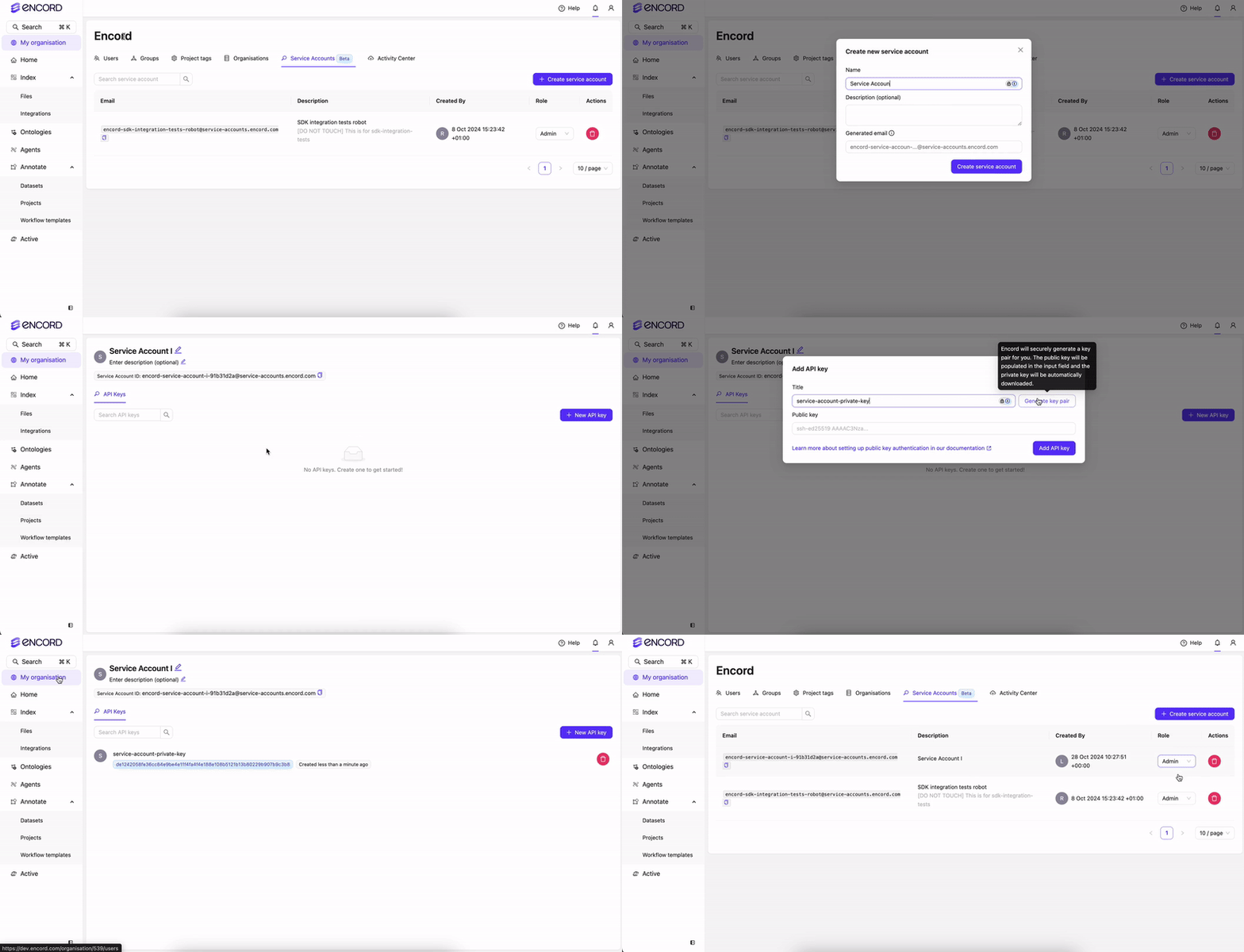
2. Click **Create service account**.
3. Provide a meaningful name for the service account. The name provided is appended into the email address used by the service account.
4. Provide a meaningful description for the service account.
5. Click **Create service account**.
A new service account appears in the Service Account list.
6. Click into the service account.
7. Click **New API key**.
8. Type a meaningful title for the key.
9. Click **Add API key**.
A file downloads to your computer containing the key.
10. Return to the **Service Accounts** page.
11. Apply a role to the service account:
* **Admin:** Executive privileges over the Workspace such as adding and removing users, and the ability to view all Projects in the Workspace.
* **Member:** No administrative privileges over your Workspace. Can only view Projects they create, or have been invited to.
Encord Admins can create 1 Service Account per Workspace. Contact us at [support@encord.com](mailto:support@encord.com) if you need more than 1 Service Account.
## Using Service Accounts
Service Accounts are NOT accessible using the Encord UI. Service Accounts can only be used through the Encord SDK.
[Generate an access key](/platform-documentation/General/general-access-keys#workspace-access-keys-recommended#generating-keys-in-encord-recommended) for the Service Account to use the SDK.
Each Service Account can create 5 access keys for use with Encord. Contact us at [support@encord.com](mailto:support@encord.com) if you need more than 5 access keys for your Service Account.
[Install the Encord SDK.](/sdk-documentation/getting-started-sdk/installation-sdk)
Update the Encord SDK regularly to use all the latest programmatic features.
[Use Encord's SDK](/sdk-documentation/getting-started-sdk/installation-sdk) to setup your programmatic pipelines.
A common use case is creating a Service Account with managerial privileges, enabling it to perform key administrative tasks on behalf of the Workspace Admin. See how to perform organization wide actions using the SDK [here](/sdk-documentation/general-sdk/sdk-org-actions).