> ## Documentation Index
> Fetch the complete documentation index at: https://docs.encord.com/llms.txt
> Use this file to discover all available pages before exploring further.
# Re-index
Re-indexing the data is not something that should be done lightly. This feature is meant to help resolve issues.
Re-index forces a full re-indexing of all images, videos, and audio files in Encord.
Encord visualizes the contents of your Folders and sub-folders. As data arrives, it is indexed automatically so content is available almost immediately. Re-indexing clears the existing index and rebuilds it from scratch, ensuring all Folder contents are accurately reflected in Encord.
## When to Use Re-index
Use re-index if you experience issues displaying, sorting, or filtering images, videos, frames, or audio files in Encord.
## How to Re-index
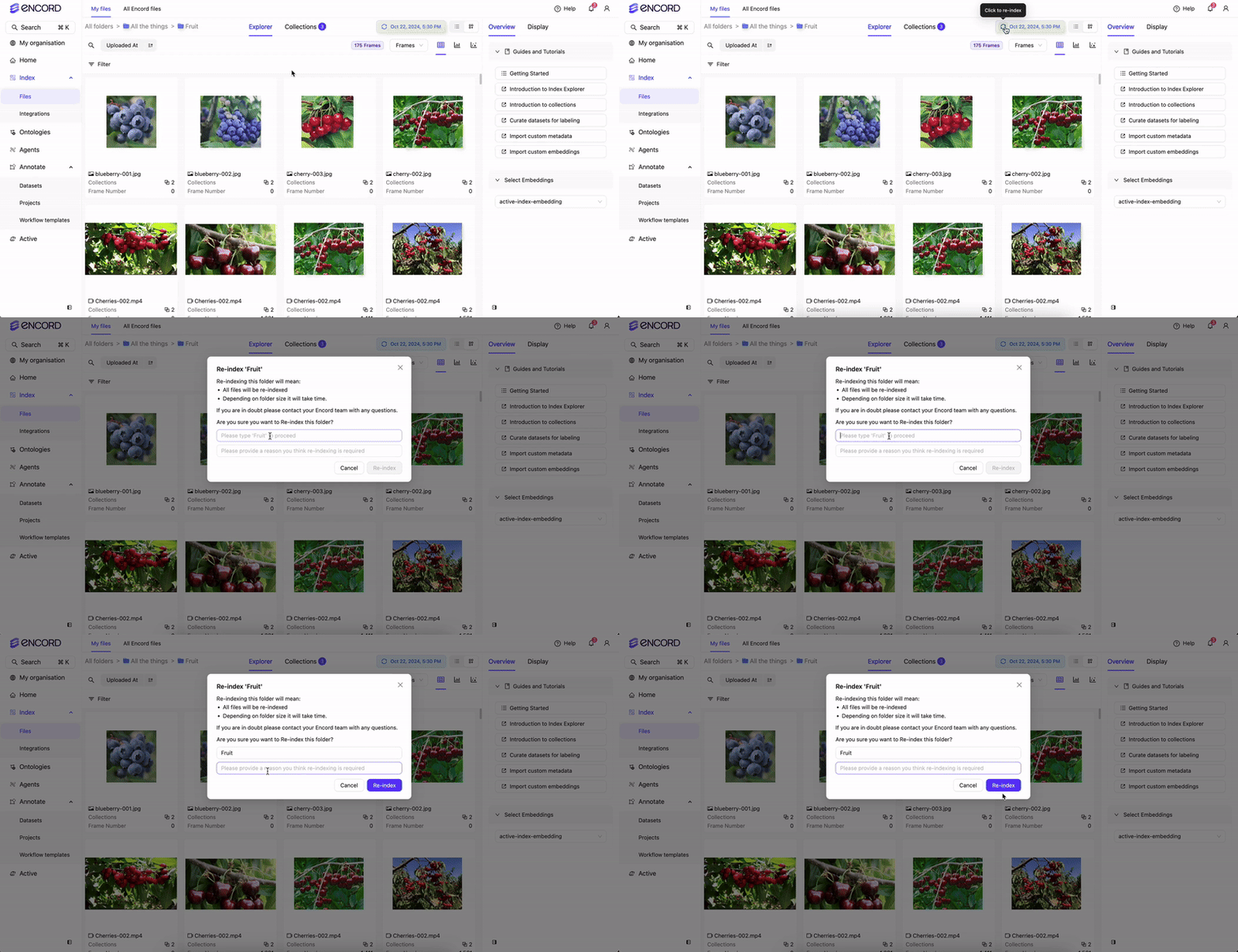
Please provide a reason why you are re-indexing. The more information you provide, the more prepared we can be with a follow-up.
Click the **Re-index** button in Encord.
## Re-indexing Duration
Re-indexing duration depends on the volume of data and the number of Folders involved. Folders with large amounts of data may take several hours to complete.
We strongly recommend against re-indexing while data is actively being imported into the Folder you are viewing in Encord.